Appitic

Saturday, April 13, 2013 No comments

Today's topic is on APPitic and it is one of my favorite sites. This site has an amazing list of Apps for Education. I really enjoy the information on Bloom's Taxonomy and all the apps that meet the different levels of Bloom's. It is always great to find interactive activities that hit all the levels of Bloom's.

You can find the following topics on APPitic:
  • Themes
  • STEM
  • Content Areas
  • Preschool
  • Special Education
  • Challenge Based Learning
  • Flipped Classroom
  • Bloom's Taxonomy
  • Multiple Intelligences
  • Physical Education
  • ISTE-NETS
  • Spanish
  • Teachers
I love the extensive list and that everything I need can be found within one site. As an educator we spend hours and hours looking for the best resources to use in the classroom and end up after many hours...just finding one or two really good resources. It is nice to stumble across a site that meets your needs fully.

APPitic even has a Facebook, Pinterest, and YouTube page. If you are a fan of Twitter, then you can find them there too.

I am so thankful that I found APPitic and have been able to share the wonderful resources that are available. If I were you, I would definitely add it your technology toolbox. It is a winner in my book! Shout out to the creator of APPitic, Alline Sada.


Infuse Learning

Friday, April 12, 2013 No comments

I am excited to blog about Infuse Learning. I have used many different student response services like Poll Everywhere, Hot Potato, Socrative, Discovery Education, Google Forms, and many more. I even use the classroom response systems (love them). Well we know not every district or school can afford a set of classroom response systems, so we need to have other routes. It is extremely important to assess our students before, during, and after classroom instruction. You don't have to do a full out assessment, but just questioning for understanding is important. 

I love Infuse Learning as I have found it very easy to set up and use with students. The online program allows you to push questions, prompts, and quizzes out to students' devices in a private virtual classroom. Only the students you set up on your account can access your quizzes/tests if you set your class up as private. There is an option for Open Enrollment which all the student would need would be the room id to enter.

You can include pictures in your test which I really really like!!! Imagine the possibilities (math, science, social studies, reading, music, art, physical education, etc..). I also enjoy that you can set a language for each student if you wish and allow for students to listen to the audio of a question. Awesome!!!

I also love that it is free and that it works with any Internet-connected device including iPads and Android tablets. You can even use it on a smartphone = )

This site scores big on my book. I hope you enjoy it as much as I have.

Learn more about Infuse Learning in the video below.

Have Fun!!


FREE Creative Writing App..Your Students will Love It!!

Thursday, April 11, 2013 2 comments
Today I want to talk about one of my favorite apps for creative writing. The name of the app is Bill Atkinson PhotoCard - Postcards

And guess what?? It is FREE!! Yes I said FREE!!

I have had the pleasure of using this app with students and teachers and it has been a huge hit!!

What I love about it is not only do they practice their writing, but they also learn the format of a postcard and adding a stamp when mailing.

The students begin by choosing a picture for the front of their postcard, in which they can use the camera from their iPad or iTouch to take pictures (field trips, playground, around the school, geometrical shapes, science experiments, etc..) or they can use the beautiful images within the the app.

Once the image is in place they can begin their writing based on the image they chose. The writing that comes from the students is amazing. They have a blast and they love that they are able to choose and change many things within their postcards. 

This app would be great to use for any subject and grade level, but here are a few ideas I have that will get you started:
    iPhone Screenshot 4
  • Students take a picture of something in nature and they are to write as though they are that picture.
  • Students take pictures while on a field trip, use the app to tell others about their favorite part of the field trip.
  • Students choose an image within the app and are challenged to be as descriptive as they can about the image. Let them know that when you read their postcard you want to feel as though you are that image.
  • Students take pictures and write about famous people, states, countries, ancient times, key vocabulary, authors, composers, etc..
  • Students create a postcard based on Science safety rules and write about the proper ways to act in a lab setting.
  • Students use this app to help them better understand difficult vocabulary words and math problems. They take a picture of the word, what it is or looks like, and then they write about it as if they were teaching someone else.

There are other add-ons within the app like stickers. I have the students add stickers and other fun stuff after they have written their postcard.

Once the students complete their postcard, they can email them to their teacher or to family members. If the students forgets the stamp, it will prompt them that every postcard needs a stamp before mailing = )

Fillable Forms and Form Central

Wednesday, April 10, 2013 1 comment
Hi everyone! I don't know about where you live, but it is really cold in Fort Worth. My idea of cold is around 60 degrees. This morning it was around 40 degrees with winds at about 30 mph...talk about chilly!! The weather has gone from the 80's to the 30's in a span of a couple of days, which means I am sick =(
Now that I have ranted about the weather let's move onto some technology.

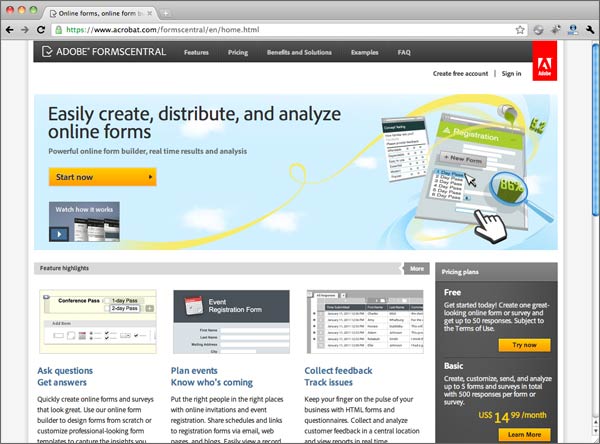
I have a love for fillable forms as they make my life easier. I don't know what I would do without Adobe Professional. My new find is Adobe Form Central...talk about lovely!! You can get a free account (includes one form and up to 50 responses). What I did was I a took a form that I had, made it fillable and then uploaded it to the Form Central site. The site then turns your fillable form into an awesome form...awesome meaning when someone fills out the form and hits submit it automatically sends all the data to a spreadsheet. I am smiling ear to ear because I am so in love. 

Even if you do not have Adobe Professional, you can use one of their own templates to create a fillable form.

I know I can use a Google form and do that (which I am a huge fan of Google Forms), but the layout of my form would have been 10 plus pages as a Google form. Using a fillable form I was able to create my document in Excel, make it fillable, and then upload it to Forms Central.

Make sure to check out Forms Central!!


April Technology Newsletter

Monday, April 1, 2013 2 comments
The April Technology Newsletter is out!! Make sure to check out the giveaway and FREE motivational treats included inside = )

April Technology Newsletter from Kristen Hernandez